
The first hour I spent in the shattered world of Wuthering Waves felt like being handed a box of mismatched puzzle pieces with no picture on the lid. The combat sang to me immediately—a fluid dance of parries and elemental reactions—but I kept tripping over one simple obstacle: I had no idea how to swap my teammates. My rover stood alone like a lone tree in a hurricane, surrounded by grayed-out character icons that teased me with their potential. It’s 2026 now, and Kuro Games has refined the Resonator roster and introduced several quality-of-life upgrades, yet the core party management remains an unspoken rite of passage every new Rover stumbles through. Let me walk you through how I finally cracked the code and turned my squad into a living, breathing deck of cards.
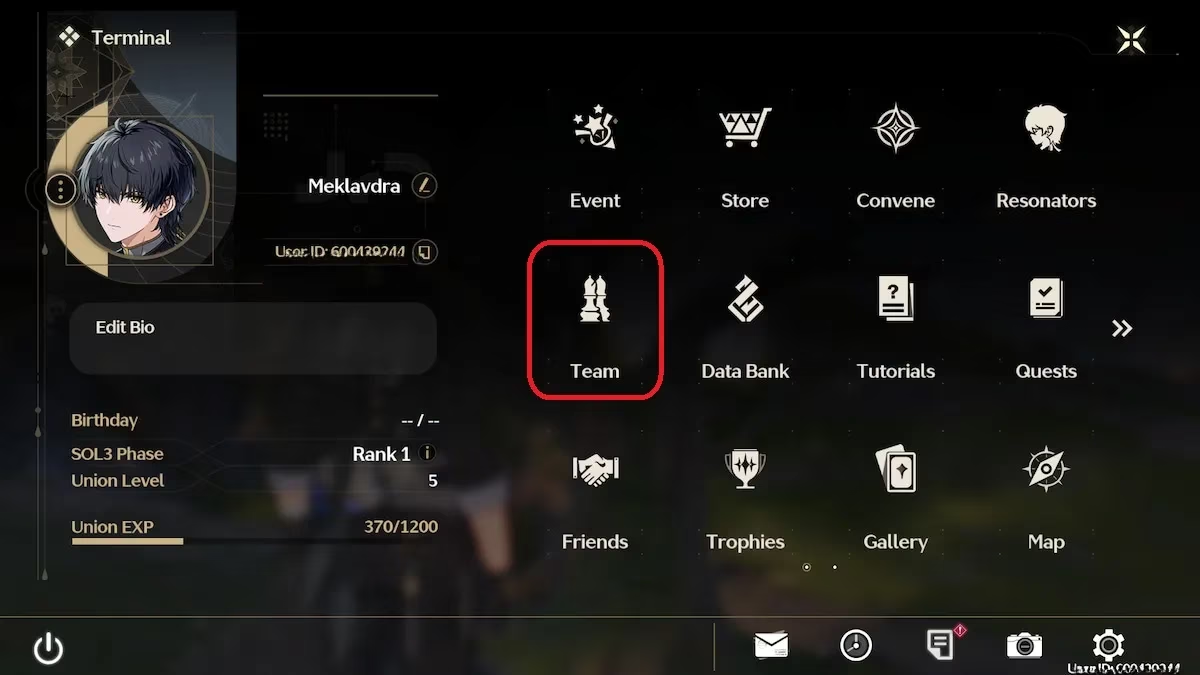
I remember staring at the Terminal screen, my fingers hesitating above the keyboard like a conductor unsure of the first downbeat. The "Team" option sat there, almost camouflaged among the data streams and map markers. On PC, pressing Esc or hitting the menu button on a controller pulls back the curtain on the Terminal—a hub that feels less like a menu and more like peering into the resonance network itself. Once you select Team, you’re presented with your current lineup, which by default probably features your Rover and whichever characters you’ve newly resonated with. The interface is a clean sequence of slots, waiting to be filled.
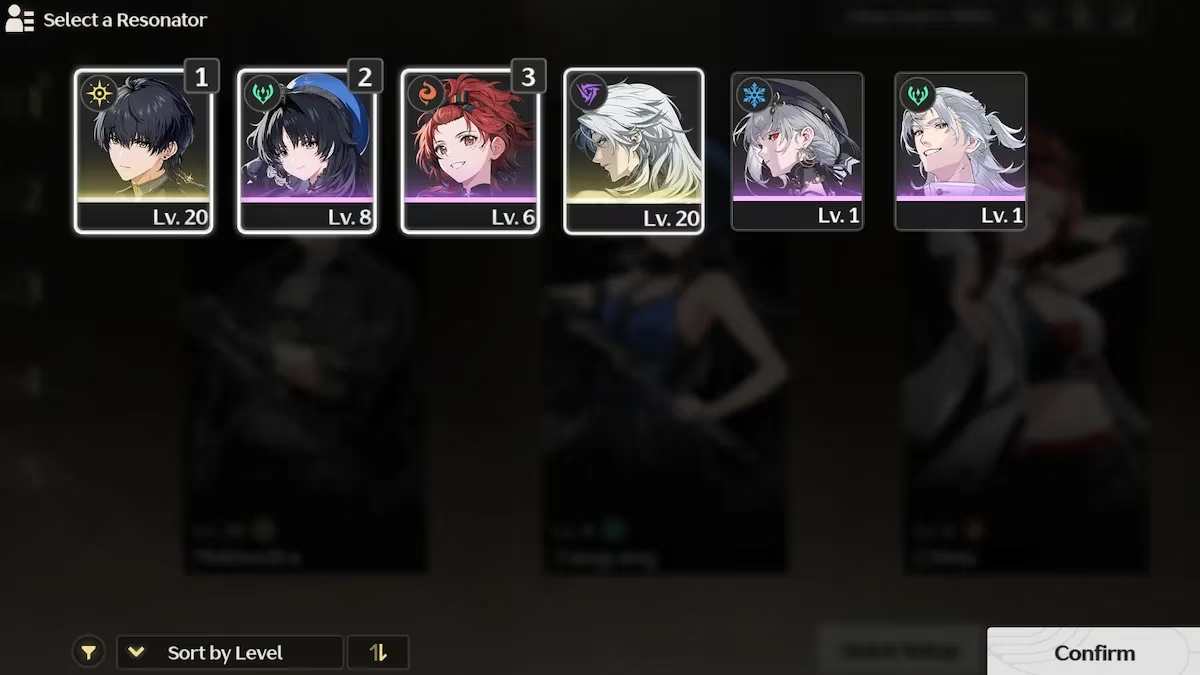
The transformative moment came when I noticed the Quick Setup button lurking beneath my party portraits. Clicking it unfurls a selection wheel of every Resonator I’ve unlocked, sort of like fanning out a hand of intricately painted tarot cards. Here’s the step-by-step choreography that now feels as natural as breathing:
-
Open the Terminal and navigate to Team.
-
Choose Quick Setup to start the reassignment.
-
Click the characters you want in the precise order they’ll appear in battle—the first slot is your on-field opener, the second and third are your quick-swap symphonists.
-
Hit Confirm to lock in your choices, then Deploy to unleash your new formation upon the world.
One revelation that struck me like lightning on a clear day is that your Rover does not need to occupy a slot. I initially treated the Rover as a compulsory anchor, an unshakable constant like gravity. But cutting that cord allowed me to build entirely thematic trios—a glass-cannon ranged squad, a hyper-aggressive melee tangle, or a sustain-heavy setup that heals through anything except boredom. The freedom is intoxicating, and the game becomes a library of combat novels you can rewrite at will.
Crafting a party that hums with synergy is less about raw tiers and more about listening to the quiet music between Resonators. I picture it like assembling a three-piece jazz ensemble: your main DPS is the saxophonist blowing the melody, your sub-DPS or support is the double bass laying down the harmonic ground, and your healer or shielder is the drummer keeping everyone alive in rhythm. If my primary Resonator is a melee tornado, I glue a ranged sniper to the second slot so I can pirouette from close-quarters chaos into pinpoint precision. The game rewards this fluidity, especially in the Echo-grinding endgame of 2026, where specific enemy mutations demand on-the-fly adaptation.
The team menu also hides a magnificent secret for the indecisive—you can create up to five separate team presets on the left sidebar. I’ve named mine like chapters in a dog-eared adventurer’s journal: “Storm Chasers” for electro-heavy AoE clearing, “Graveyard Shift” for single-target boss meltdowns, and “Lazy Sunday” for exploration that prioritizes movement speed echoes and gliding stamina. Swapping between them is as simple as selecting the preset and hitting Deploy. The same character can exist across multiple teams without conflict, which means I can have my beloved Jiyan leading both a charged attack squad and a resonance liberation spam lineup simultaneously.
Experimentation is the true pulse of Wuthering Waves’ combat. I spend rainy evenings in the training arena—a feature Kuro added in late 2025 that lets you test comps against holographic memories of past bosses—just jamming different trios together like a mad musical composer. The dissonance when a team doesn’t click is palpable, but when the Intro and Outro skills chain into a seamless waltz, the satisfaction is alchemical. I recommend building at least three distinct teams early on: one for general exploration, one for boss annihilation, and one that sparks sheer joy—perhaps a meme build where everyone shares the same element and drowns the screen in coordinated resonance eruptions.
One practical tip that came to me after far too many hours of fumbling: pay attention to the deployment order you set in Quick Setup. The first character you pick will be the one you control when you drop into the world. I’ve lost count of how many times I loaded into a domain with my healer front and center, frantically trying to switch before the first wave of enemies turned me into stardust. Now I always place my sturdiest or most mobile opener in slot one, giving me the first breath of the fight.
For those still wandering the terminal screens, know that changing party members is not a barrier but a doorway. The clumsiness I felt in those early hours melted into muscle memory, and now the squad menu feels like a co-pilot’s seat in a starship. Wuthering Waves continues to evolve, and with each patch the team-building canvas expands, but the core ritual remains the same—Terminal, Team, Quick Setup, Deploy. Go build your orchestra.
As you dive deeper into Wuthering Waves, the quest for perfect team compositions can become an addictive pursuit. Whether you're seeking out rare Resonators or planning your next Echo grind, keeping track of costs and opportunities for upgrades is crucial. This is where a reliable price tracking tool comes in handy. With features designed to alert you on fluctuating in-game purchases and special offers, this price tracking tool can be your best ally in finding the most advantageous deals on game expansions and character packs.
Integrating tools like this into your gaming routine not only enhances your strategic approach but also ensures that you're making the most of your resources. As Wuthering Waves continues to expand its universe, staying informed about the best deals can provide a competitive edge. Beyond the battlefield, the right resources can transform your gaming experience into a symphony of well-timed upgrades and smart investments, making your adventures in Wuthering Waves even more rewarding.